


Psst, lo tenemos en español
Puedes leer este artículo en español haciendo clic en el botón de abajo.
You might encounter the following problems when your eSIM isn’t connected to a data network:
- Extremely slow download/upload speeds
- Only "E" (Edge) appears in the signal status, instead of 4G LTE or 5G
- No Internet connection, even though the eSIM shows it’s connected
DO NOT DELETE THE ESIM FROM YOUR PHONE! If it isn’t working, don’t worry-follow the steps below or Contact Us if you need further help.
Manually select a network
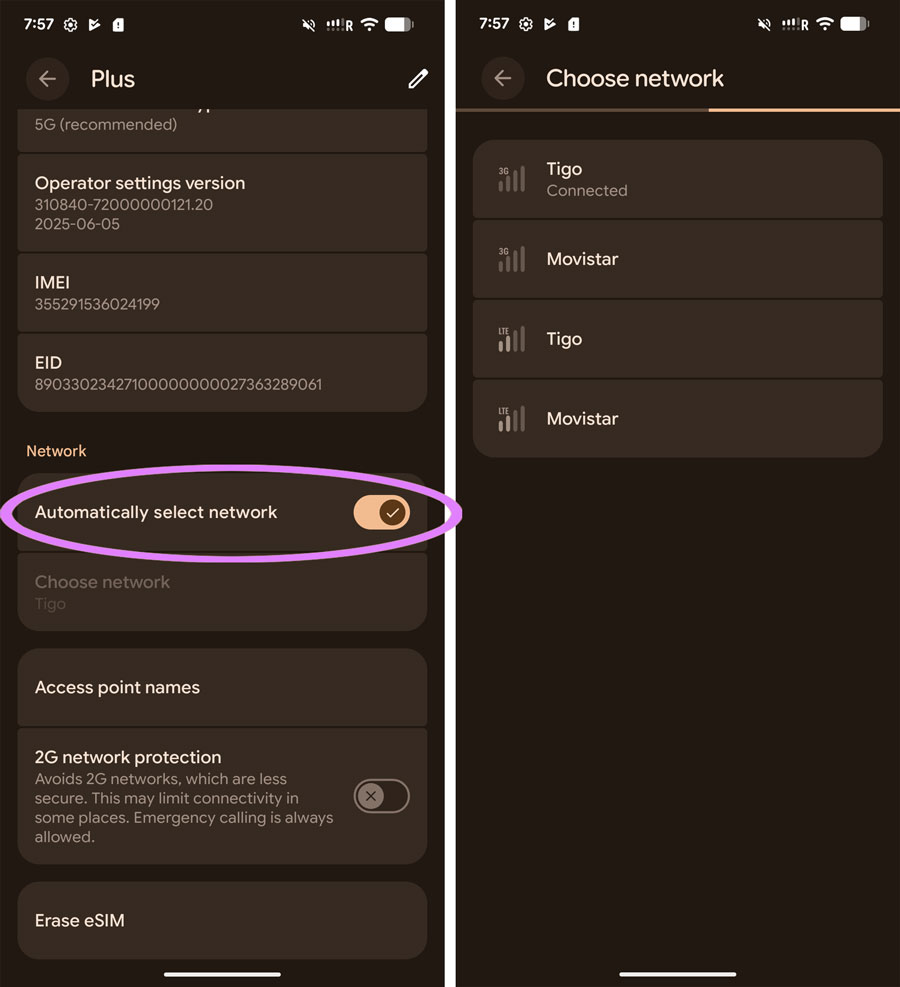
- Open Settings > Network & Internet > SIMs > Select your Travel eSIM
- Scroll down to Network and turn off "Automatically select network" > Wait a few seconds for networks to load
- Please select one of the available networks from the list - you may try more than one as we support many
- Turn on Airplane mode, wait 30 seconds, then turn it off again
Still not working?
Contact us and we'll get you sorted as soon as possible (usually within a few hours). In rare cases there may be no service in the area or a network outage beyond our control, sometimes we may need to replace your eSIM but we'll do everything we can to get you connected.

Suscríbete
Únete a nuestra comunidad
Te contactaremos cuando lancemos nuevos productos, proyectos de sostenibilidad, promociones, innovaciones o incluso contenido interesante que creemos que vale la pena compartir contigo.


